

Music Metadata: What It Is, Why It Matters & How to Get It Right

Updated for 2026
Music metadata is the information that identifies a recording, describes a release, and credits the people behind it.
It includes your artist name, song title, songwriter credits, release date, and identifiers such as ISRCs.
For independent artists, getting these details right helps your music appear on the correct artist profile, gives collaborators proper credit, and supports royalty matching. Getting them wrong can mean correcting a release when you should be promoting it.
Most of the work happens before you upload. Here’s what to check.
What Does Music Metadata Include?
When you submit a release through a music distributor, the information you enter becomes part of the metadata delivered to streaming platforms.
Other metadata lives in audio files or databases used for publishing and rights administration. These records serve different purposes. Updating one does not automatically update the others.
Here’s an example using a fictional acoustic single:
| Field | Example | What to check |
|---|---|---|
| Track title | After the Rain | Match the intended spelling and punctuation. |
| Main artist | Maya Rivers | Use consistent formatting across releases. |
| Featured artist | Jordan Lane | Enter the artist separately with the correct role. |
| Release title | After the Rain (Acoustic) | Follow your distributor’s instructions for formatting version information. |
| Version | Acoustic | Use the designated version field where available. |
| Songwriters | Maya Bennett, Jordan Ellis | Confirm the appropriate songwriter names, which may differ from stage names. |
| Producer | Casey Morgan | Confirm the name and contributor role. |
| Explicit content | No | Check the actual recording, not just its title. |
Your submission may also include genre, language, release date, track order, label information, and copyright notices. Follow your distributor’s requirements for each field.
ISRC vs. UPC: What’s the Difference?
An ISRC identifies a specific recording. A UPC identifies a release.
If you release a song as a single and later include the same recording on an album, the recording retains its ISRC. The single and album have different UPCs because they are separate releases.
IFPI’s ISRC guidance explains when to retain a recording’s code. For a practical example, see CD Baby’s instructions for adding a previously released single to an album.
Why Is Music Metadata Important?
Your Music Appears on the Right Artist Profile
Your artist name, contributor roles, and release details affect how your music appears on streaming platforms.
Spotify’s metadata guidelines recommend consistent artist-name formatting and separate fields for each artist. Before submitting, also verify the artist profile selected for your release wherever your distributor provides that option.
An artist with a similar name is easy to overlook in a dropdown menu. Check the profile link, not just the display name.
If you haven’t accessed your artist dashboard yet, here’s how to claim your artist page on Spotify, Apple Music, and other streaming services.
Your Music Can Be Matched to the Right Royalty Records
Royalty matching depends on identifying the music that was used and connecting it to the appropriate records.
For example, The Mechanical Licensing Collective helps match recordings to musical works for eligible U.S. digital mechanical royalties. Missing or inconsistent information can complicate that process. The MLC’s data programs explain how it addresses these gaps.
Entering songwriter credits during distribution does not necessarily complete your publishing registrations. Check what your distributor handles and what remains your responsibility or your publishing administrator’s.
Your Collaborators Receive Proper Credit
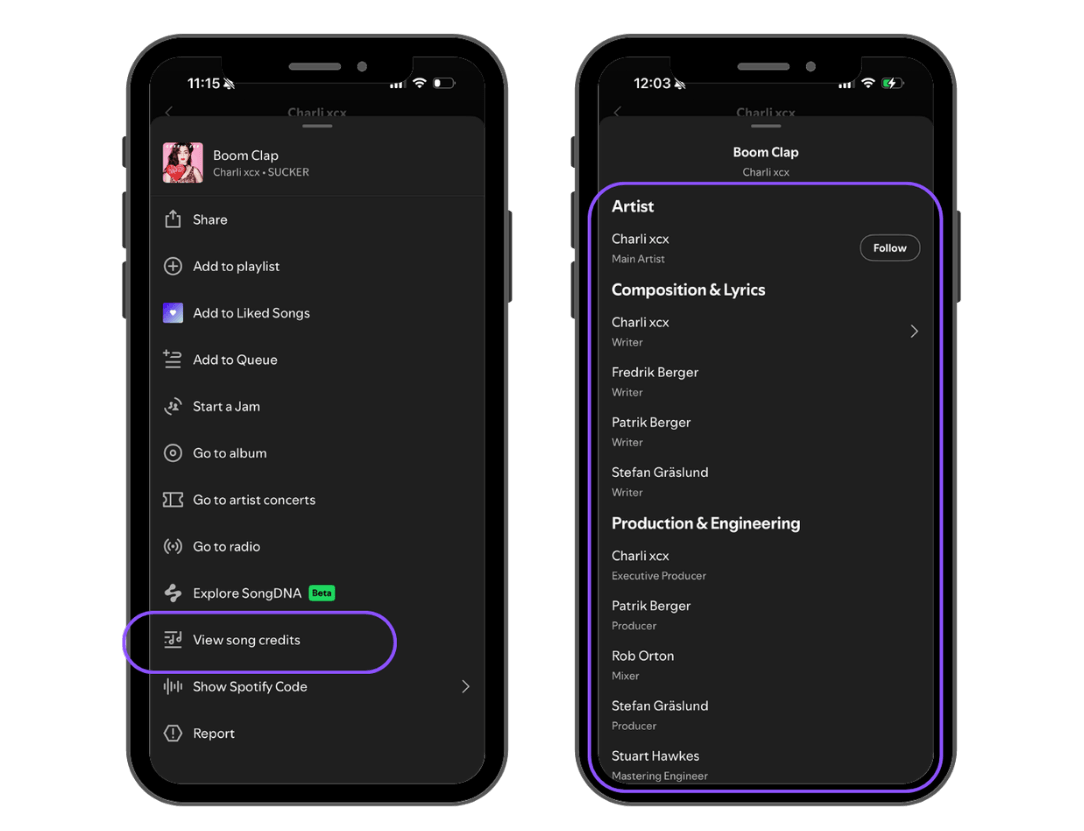
Collect songwriter, producer, performer, and engineer details before uploading.
Spotify displays credits supplied through label or distributor metadata, although support for different credits varies by distributor. Confirm which contributor fields yours accepts, and ask collaborators to check their names and roles before submission.
Common Music Metadata Mistakes
These are worth checking before every release:
- Selecting the wrong artist profile. Verify profile links or IDs, especially when another artist shares your name.
- Using the wrong artist role. Confirm who should appear as a main artist, featured artist, or remixer.
- Giving an unchanged recording a new ISRC. Retain its existing identifier when using the same recording on another release.
- Reusing an ISRC for a different recording. A materially changed recording may need a new code. Check IFPI’s assignment guidance for the relevant version.
- Treating payout splits as songwriting registration. Confirm whether a tool divides distributor revenue, administers publishing, or does both.
- Waiting until release day to confirm credits. Get collaborators’ names and roles approved while you still have time to make corrections.
How to Check Your Music Metadata Before Release
Keep one master record for each release. A spreadsheet is enough: save the final titles, contributor details, artist profile links, ISRCs, UPC, and release date together.
Then review your distributor submission against it.
Your Pre-Release Metadata Checklist
- Artist names are spelled and formatted consistently.
- Main and featured artist roles are correct.
- Artist profile links or IDs point to the intended artists.
- Track titles, release titles, and version labels are accurate.
- Collaborators have confirmed their names and credits.
- ISRCs match the recordings being submitted.
- Genre, language, and explicit-content settings are accurate.
- Release date and track order are correct.
- Songwriting splits are agreed, with relevant registrations handled or assigned to the person responsible.
- A copy of the submitted information is saved.
After release, check the live pages too. Open the track from its public link, confirm the artist profile, and review the available credits.
Do this before sharing your song with curators or sending listeners to it through a promotion campaign.
Planning for bigger milestones? Read our RIAA certification guide for independent artists to learn how streams and sales count toward Gold and Platinum records.
How to Fix Incorrect Metadata on Spotify
For an existing Spotify release, request metadata corrections through your label or distributor. Spotify’s correction instructions explain that the provider must deliver the updated information.
To make the request easier to process:
- Find the release in your distributor dashboard.
- Identify the incorrect field and provide the exact replacement.
- Include the release link and relevant ISRC or UPC.
- Submit the edit or contact distributor support.
- Check the live release once the update has been processed.
Available edits and processing times vary. Ask your distributor how to handle the correction before taking down or resubmitting a release.
If your music appears on the wrong artist profile, Spotify also offers a content mismatch reporting process through Spotify for Artists.
For more on how Spotify identifies artists on the platform, see our guide to Spotify’s artist verification system.
Music Metadata FAQs
How do I add metadata to music?
For streaming distribution, fill out the release and track information requested by your distributor. For audio files stored on your computer, use a metadata editor that supports the file format. Editing a local file does not update an existing streaming release.
Can I change music metadata after release?
Many corrections can be requested through your distributor or label. The changes available depend on the provider, platform, and field you need to update. Check the process before removing your release.
Can music metadata help me get on playlists?
Accurate metadata helps curators identify your release and find the correct artist. It does not guarantee placement. Choose genres that accurately describe your music rather than treating genre tags as a shortcut to a particular playlist.
Does an ISRC identify the song or the recording?
An ISRC identifies a specific recording, not the underlying composition. A studio recording and a separate live recording of the same song are different recordings and require distinct identifiers.
Is accurate metadata enough to collect all my royalties?
No. Accurate information supports matching, but you also need the appropriate registrations and collection arrangements. Confirm which royalties your distributor collects and which are handled through your publishing administrator or other relevant organizations.
Looking to Promote Your Music?
Try our Spotify Playlist Pitching and TikTok Music Promotion services.